Edit/Delete the marked attendance
Only the administrator or a privileged employee (Employee Attendance privilege is required) can edit/delete leave marked from the attendance register. Follow the below steps to edit/delete the marked attendance.
Click on the marked attendance. Pop-up page will be displayed as shown in the below image.
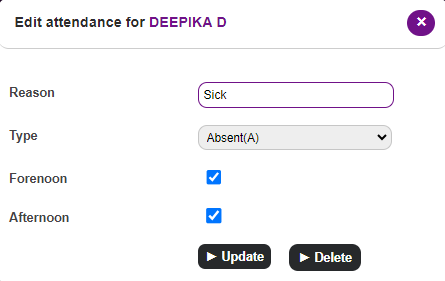
Select the Delete button to delete the attendance marked or Make the necessary changes to edit the leave and use the Update button to save the changes
Once deleted, the student will be considered ‘present’ for that day. The leave count will be updated in the attendance report.
Contact
Get in touch with our support team anytime.
Phone
info@sharakshara.com
+91 8073157220
© 2025. All rights reserved.