How can we add custom fields to record hostel additional details?
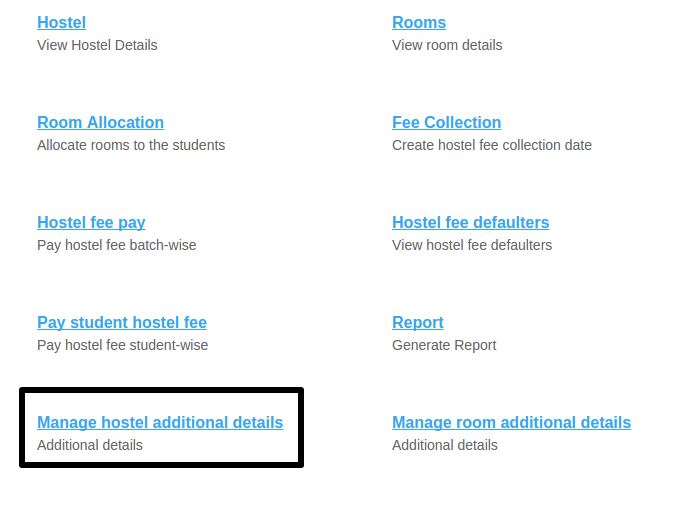
At the top of your dashboard, click the module access icon > Administration > Hostel > Manage hostel additional details to open the Manage hostel additional details page.
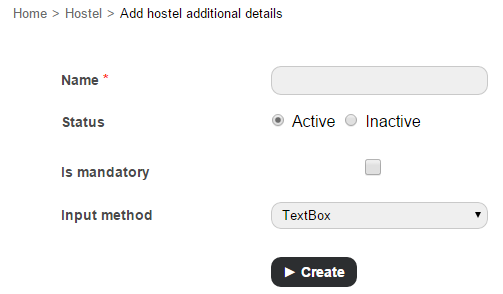
In the Name field, enter the name of the field that will be used when recording hostel details.
Specify the status of the additional field:
Active – An additional detail field with this status will be available when recording hostel details.
Inactive – An additional detail field with this status will not be available when recording hostel details. Note: You can inactivate an additional detail field at any time.
Select the Is mandatory check-box to set this field as a mandatory field that must be filled when recording hostel details.
In the Input method field, select the required field input method from the following options:
Select Box – Select one option from a drop-down list.
Check Box – Select one or more items from a set of options.
Text Box – Enter brief text information
Click the Create button.
Use the arrow icons to determine the order that the fields will appear when recording hostel details.
Contact
Get in touch with our support team anytime.
Phone
info@sharakshara.com
+91 8073157220
© 2025. All rights reserved.