How can we enable roll number for students?
At the top of your dashboard, click the module access icon > Administration > Settings to open the General settings page.
Select the Enable roll number for students checkbox
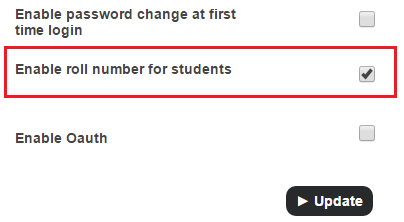
Note: If you select this checkbox but do not assign student roll numbers, roll number columns throughout Sharakshara will be remain blank. So if you decide not to assign student roll numbers, we recommend not to select this checkbox.
Click the Update button.
Some of the important pages/modules in which you will see student roll numbers are:
Data Exports
Student profile and student reports
Attendance reports
All reports in the Reports center
All fee receipts
Batch summary
Remarks
Online Exam
Contact
Get in touch with our support team anytime.
Phone
info@sharakshara.com
+91 8073157220
© 2025. All rights reserved.