How do applicants register for a course online?
For applicants to be able to register for courses online, the URL “www.yourschooldomainname.com/register” must be made available. When applicants access the URL, they will be directed to a page similar to the one below.


Based on how you’ve set up the courses, applicants can register for courses either with a PIN number or without a PIN number. After selecting the course and entering the PIN number, the admission form is displayed. The applicant will be required to provide the following information:
Personal details
Contact details
Choose the elective subjects
Last attended institution details
Upload a picture
Parent personal details
Parent contact details
Additional details (if enabled)
Attached documents such as transcripts
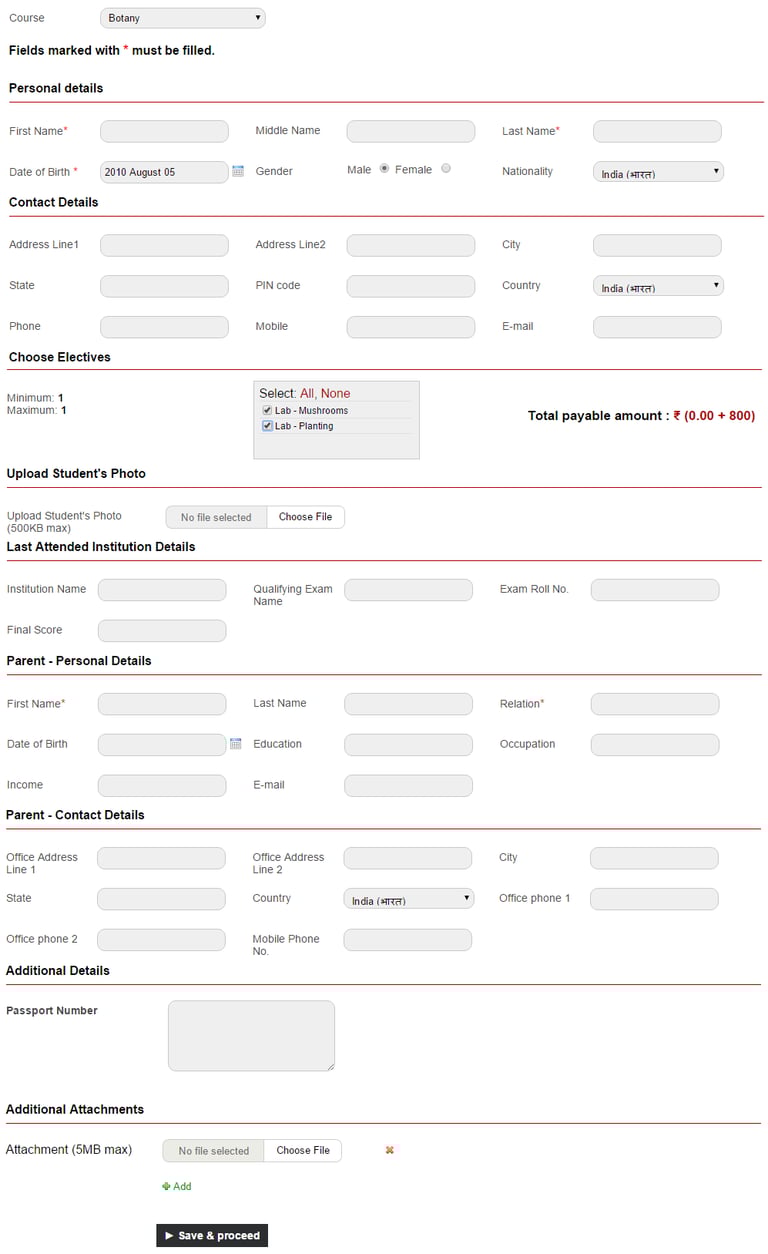
When the applicant clicks the Save & Proceed button, they will be taken to a page where they can print their application and pay the application fees online. The option to pay is available only if you have enabled and set up the Online Payment plugin.
Contact
Get in touch with our support team anytime.
Phone
info@sharakshara.com
+91 8073157220
© 2025. All rights reserved.