How to collect hostel fee as userwise?
When collecting and processing hostel fees for each student, a full payment transaction must be created. You cannot create a partial fee payment transaction.
At the top of your dashboard, click the module access icon > Administration > Hostel > Pay student hostel fee.
Enter the name or admission number of the student to search.
Click on the student’s name.
Select a fee collection.
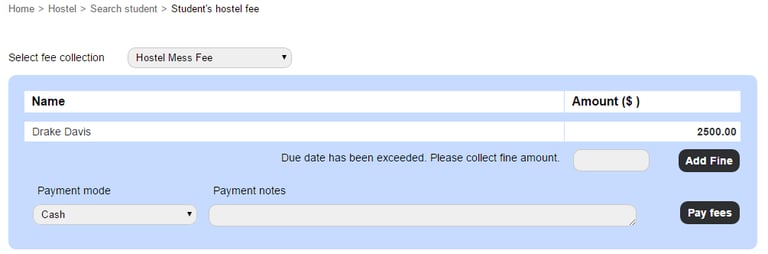
If the due date for the fee collection has passed, enter the applicable fine amount and then click the Add Fine button.
Select the payment mode from the following options:
Cash
Online Payment
Cheque
DD (Demand Draft)
Others
Enter the payment notes.
Click the Pay fees button.
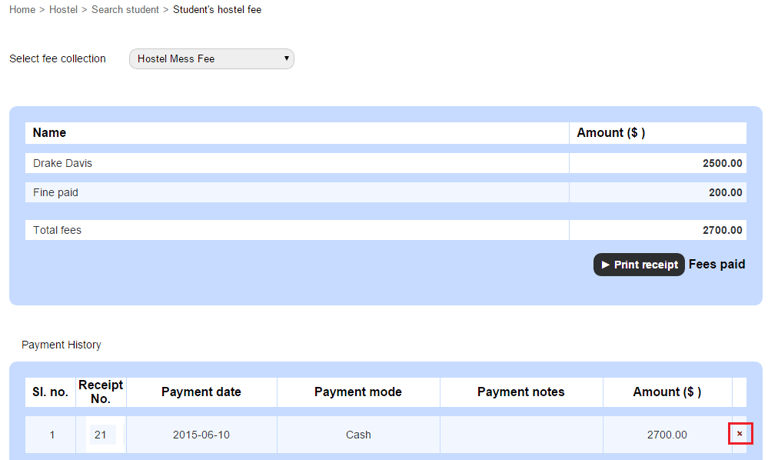
Click the ‘x’ icon if you want to revert the transaction.
Click the Print receipt button to generate a PDF of the receipt, and then print the receipt.
Contact
Get in touch with our support team anytime.
Phone
info@sharakshara.com
+91 8073157220
© 2025. All rights reserved.