How to delete an event?
Only general events and holidays can be deleted from the Calendar. Other events such as examinations and book/fee dues must be deleted from their respective modules.
To delete a general event:
At the top of your dashboard, click the module access icon >Academics>Calendar to open theCalendar.
Hover over the black icon that indicates a general event. The event details are displayed on the right.
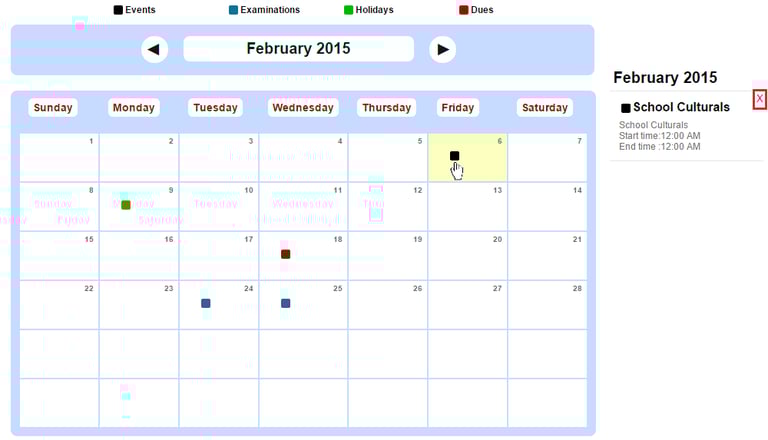
Click the ‘x’ beside the event details to delete the event.
To delete a holiday event:
At the top of your dashboard, click the module access icon > Academics > Calendar to open the Calendar.
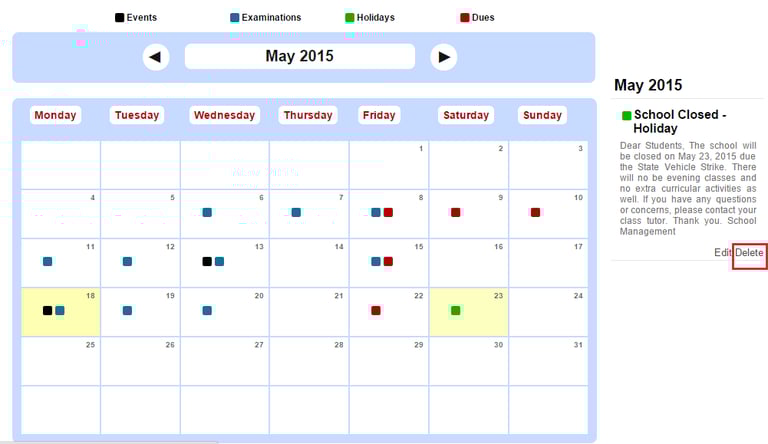
Hover over the green icon that indicates a Holiday. The event details are displayed on the right.
Click Delete beside the event details to delete the event.
Contact
Get in touch with our support team anytime.
Phone
info@sharakshara.com
+91 8073157220
© 2025. All rights reserved.