How to list all the deleted hostel fee transactions?
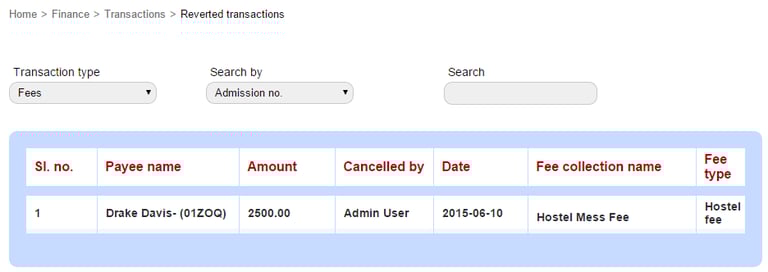
Deleted transactions are listed in the Reverted transactions page. Only the Administrator or a Privileged Employee (Revert Transaction privilege must be provided) can view the deleted transactions.
At the top of your dashboard, click the module access icon > Administration > Finance > Transactions > Reverted transactions to open the Reverted transactions page.
Select the transaction type as Fees.
Search using the following options:
Admission no. – Enter a student’s admission number to search.
Date – Specify a date range.
Fee collection name – Enter a fee collection name to search.
Contact
Get in touch with our support team anytime.
Phone
info@sharakshara.com
+91 8073157220
© 2025. All rights reserved.