Feature Access Settings
As per the institute's requirement, the Admin or the Privilege user can give different feature access to the Parent through which Parent or Guardian will be able to access the information related to their ward using Sharakshara.
Feature Assess settings option is used to configure or enable the list of features that the parent/guardian of your institution can have access to. This list includes:
Gallery: To see the shared gallery
Hostel: To see the ward’s hostel details
Transport: To see the ward's transport details.
Student’s Documents: To see the ward’s documents.
Assignment: To see the ward’s homework or assignments.
Tasks: To see the tasks.
To configure the Feature Assess settings, Admin or the privileged user has to follow the below steps:
At the top of your dashboard, click the Menu> Administration > Settings > Feature access settings to open the feature access settings page.
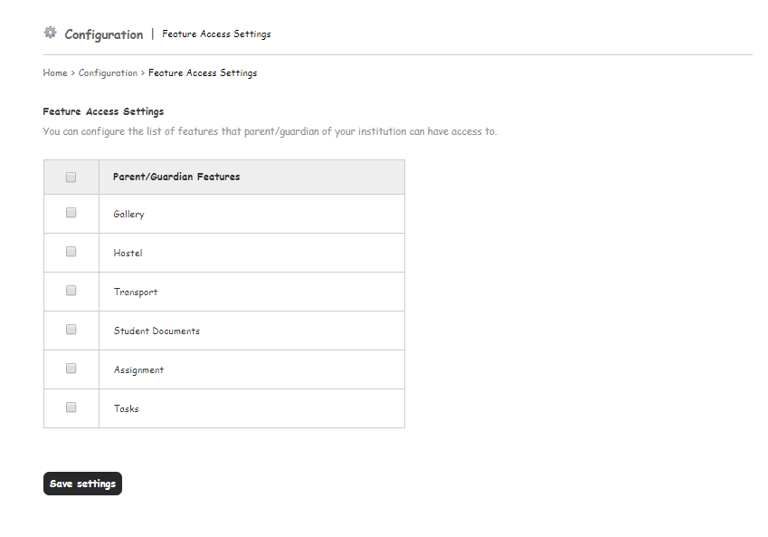
2. Click on the Checkbox for the below feature for which institute needs to give access to the Parent or the Guardian.
Gallery
Hostel
Transport
Student’s Documents
Assignment
TasksGallery
Fee
Timetable
3. Click on the Save settings button to save the configuration.
Contact
Get in touch with our support team anytime.
Phone
info@sharakshara.com
+91 8073157220
© 2025. All rights reserved.