How an employee subject association details report is helpful?
The Employee subject association Details report lists all the active employees and their associated subjects in a batch. This report will help you to keep the track of the Subjects an employee is handling.
The administrator or a privileged employee (View Additional Reports privilege is required) can Export the report in CSV format from the Reports module.
At the top of your dashboard, click the module access icon >Data and Reports>Reports>Employee subject association Details.
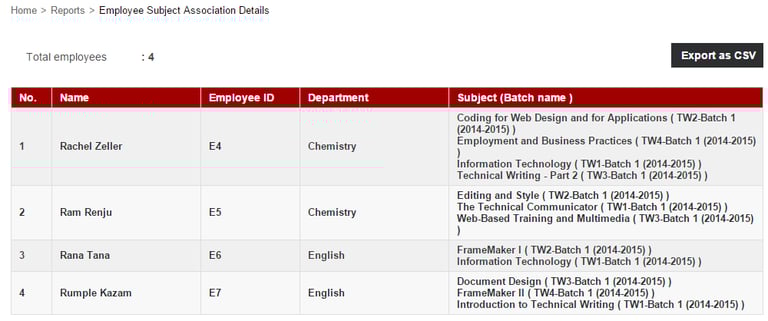
The Employee subject association Details report lists all the active employees and their associated subjects in a batch. This report will help you to keep the track of the Subjects an employee is handling.
The administrator or a privileged employee (View Additional Reports privilege is required) can Export the report in CSV format from the Reports module.
At the top of your dashboard, click the module access icon >Data and Reports>Reports>Employee subject association Details.


Note: A CSV file can be opened using a Application such as Microsoft Excel, LibreOffice.
Contact
Get in touch with our support team anytime.
Phone
info@sharakshara.com
+91 8073157220
© 2025. All rights reserved.